Announcement
What CronEcho does for AI agent teams
How CronEcho tracks AI agent runs, enforces budget caps and timeouts, and escalates alerts until a person on your team acknowledges them.
An agent that fails loudly is easy to deal with. The expensive ones fail quietly: they loop on a tool call for an hour, spend fifty dollars of tokens on a task worth fifty cents, or stop running altogether without anyone noticing. CronEcho exists to catch those.
CronEcho started as a dead man’s switch for cron jobs. Your job pings a URL when it finishes, and if the ping does not arrive on time, you get an alert. Agents need the same thing plus a few more guardrails, so CronEcho now tracks them as a first-class monitor type.
How an agent run is tracked
Each agent gets its own API key. The agent reports four lifecycle events: start, progress, complete and fail.
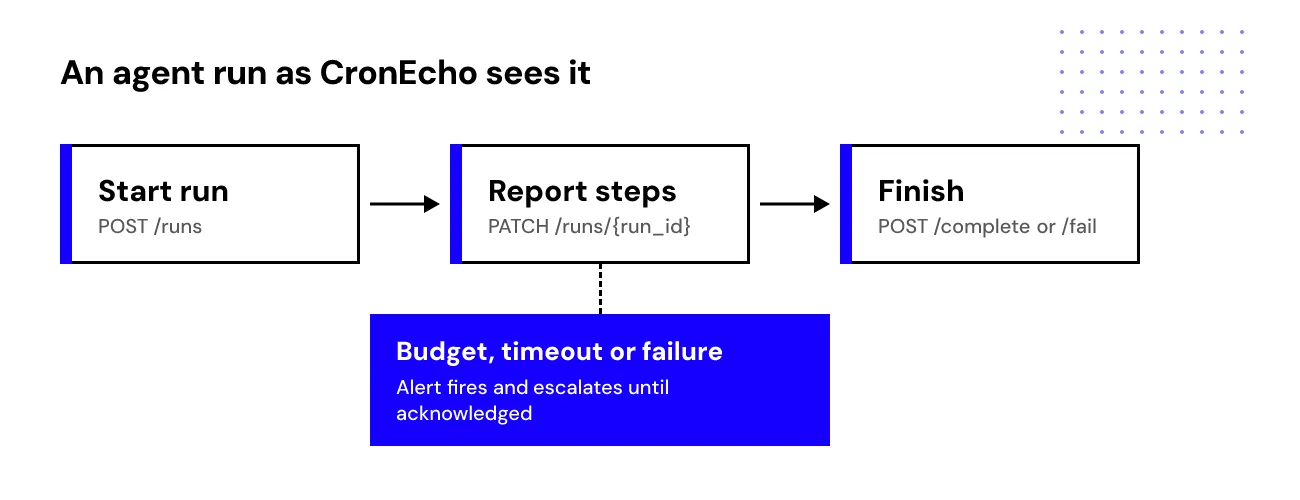
In Python, a run looks like this:
import os
import httpx

API = os.environ["CRONECHO_API_URL"]          # from your CronEcho dashboard
AGENT_ID = os.environ["CRONECHO_AGENT_ID"]
headers = {"Authorization": f"Bearer {os.environ['CRONECHO_AGENT_KEY']}"}

run = httpx.post(f"{API}/api/agents/{AGENT_ID}/runs", headers=headers).json()
run_url = f"{API}/api/agents/{AGENT_ID}/runs/{run['id']}"

try:
    for step in plan:
        result = execute(step)
        httpx.patch(run_url, headers=headers, json={"step": step.name, "cost_usd": result.cost})
    httpx.post(f"{run_url}/complete", headers=headers)
except Exception as exc:
    httpx.post(f"{run_url}/fail", headers=headers, json={"error": str(exc)})
raiseGuardrails you can set per agent
On the Pro plan and above, each agent can have three limits:
- Budget cap. The maximum spend for a single run. Crossing it fires an alert.
- Step timeout. How long one step may take before CronEcho treats it as stuck.
- Run timeout. How long the whole run may take.
A run that fails, breaks one of these limits, or never reports back raises an alert.
Alerts that escalate
Alerts go to the channels you configure: email, SMS, voice call, Slack, Telegram, Discord, a webhook, PagerDuty or OpsGenie. Alert policies can escalate in steps, for example Slack first, then SMS, then a phone call to whoever is on call, until someone acknowledges.
Cron jobs still work the same way
If you also have plain scheduled jobs, they need one line:
curl -fsS "https://cronecho.com/ping/$CRONECHO_TOKEN?status=$?&duration=$ELAPSED_MS"Agents, cron jobs and longer workflows all show up together in one monitor list.
When the agent should ask first
Monitoring tells you after something went wrong. For actions you never want an agent to take on its own, like refunds, deletes or production deploys, it should stop and ask first. That is what our second product is for:
Try it
CronEcho has a free plan. Set up one agent, send a test run, and watch the alert arrive on your phone.